Concepts
File Identity
In file-centric pipelines, identity serves as the anchor and is indispensable
in cloud-native systems. To make it simple and portable, we introduce the
urgap.UFile and its associated urgap canonical file signature (ucfs),
inspired by ISBNs for books. Just as the same title can live in many bookstores
yet keep one identifier, ucfs lets identical data objects exist across storage
backends and clouds while preserving identity. A ucfs combines the object name
and a content hash, e.g. <object_name>@<md5>.
urgap.UFile uses standard URIs and assigns the object name
to the fragment: <schema>://<location>#<object_name>
The checksum is provided as a URI query parameter or as metadata tags. The hash algorithms are pluggable, e.g., MD5 or blake2.
By separating where an object lives (location) from what it is (identity), urgap makes file identity location-agnostic, enabling seamless retrieval and equality checks across clouds, simplifies migration, and lays the groundwork for a data cataloging, file mesh and discovery layer that exceeds traditional storage boundaries.
Using UFiles, the data abstraction layer
import urgap
uri = "https://www.tagesschau.de/multimedia/bilder#ukraine436~_v-gross20x9.jpg"
# please note the # to separate location and identity
# the schema (http) defines how to talk to the storage backened, ie which UFile IO interface to use
# the url defines where the storage backend is
# the framework defines the object name

ufile = urgap.UFile(uri=uri)
# initalizes UFile with remote location
print(ufile.path)
# Accessing the path attribute automatically downloads the file

ufile.tags.update({"source": "tagesschau.de"})
# Update tags locally. Tags are used to store metadata of the file. E.g. md5 is
# stored here as well.
# Some storage backends support tags by default. For others urgap generate a json
# next to the file which holds the tags.
# Urgap also stores data lineage etc as part of those tags.

from pathlib import Path

ufile.rebase(f"file://{Path.home()}/Desktop/")
# Changing ufile schema to file (Python) and location to ~/Desktop.
# Rebase can be used change storage backend but also to change identity,
# i.e. rename teh object.
ufile.upload()
# Uploads scratch file to new rebased destination.
# Can also be included in the rebase methode with upload=True
Note
Please refer to UFile Class for more details on, e.g. URI.
Provenance as Code (PaC)
Provenance, lineage, and reproducibility sit at the core of modern workflows. We adopt Provenance as Code (PaC), a paradigm where lineage is embedded directly in the processing architecture rather than bolted on afterward.
Unlike traditional systems that record provenance through separate system stores, PaC encodes
key lineage into the output filename. In urgap, users and pipelines do not choose
output names. Each name is a deterministic digest of the processing parameters
that affect results, the algorithm and its version, and the input file signatures
(the list of ucfs, see below and Figure 2). The result is an immutable PaC hash
that supports global smart rerun and reproducibility. Files in different locations
are treated as the same asset if their ucfs match, enabling identity-based reuse
across environments. This design plays well with explicit pipeline specs,
reproducible forks, and a data-mesh style where files are referenced by signature
and resolved to physical locations through a decentralized, optionally customizable
resolver.
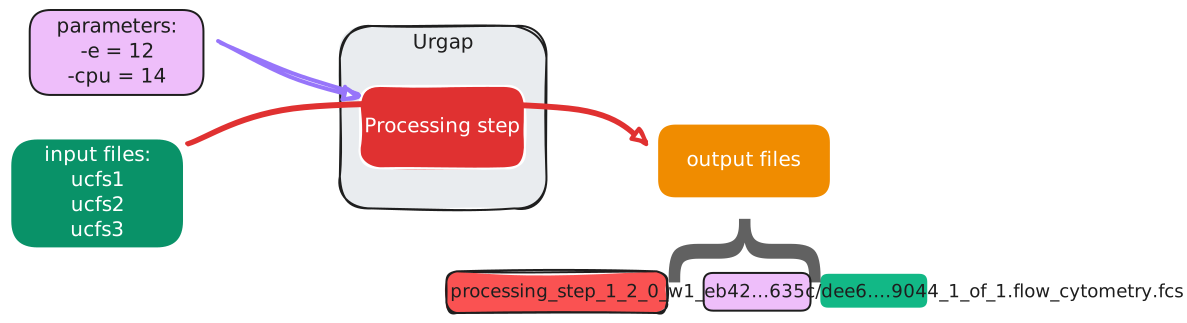
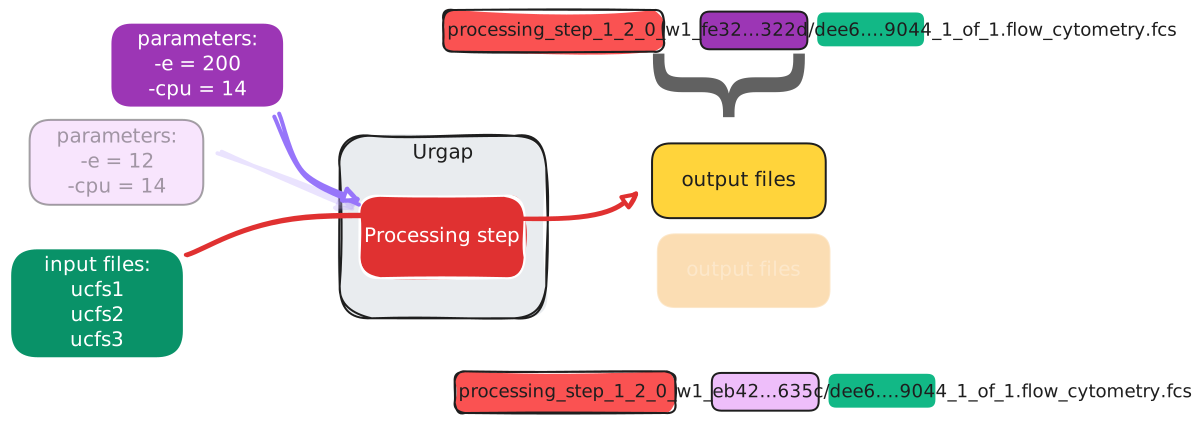
Figure 2: Provenance as Code (PaC). a) Three elements feed the PaC hash for an output: i) the input files’ urgap canonical file signatures (ucfs, green), ii) the resource identifier (red), and iii) only those parameters that affect results (e.g., not thread counts, purple). b) Changing a result-affecting parameter yields a different parameter digest and thus a different PaC hash.
Forking from an existing pipeline or defining one without knowing what outputs already exist, urgap will skip steps whose outputs are already present. The encoded provenance inherently supports the FAIR principles (Findable, Accessible, Interoperable, Reusable), as every asset carries its own lineage, making it self-describing and easier to govern without extra workload. Additionally, urgap tracks the lineage tree in ufile tags.
Since the PaC hash cannot directly be mapped back to execution details, additional run metadata has to be recorded elsewhere if required. Such a metadata storage capability is also implemented in urgap as urgap.umeta and is populated automatically during and after execution, tracking e.g. execution times and user-defined metrics. For end-to-end visibility, urgap also exports traces using the OpenTelemetry standard.
Standardized Service Interfaces
Standardized interfaces create an abstraction layer that shields applications from the underlying implementation details, enabling seamless switching between providers and technologies as needs evolve. Without standardization, teams burn time writing bespoke connectors and maintaining integration glue code (Luttmer et al. 2022). Clear, shared interfaces cut technical debt and free engineers to ship actual value instead of rebuilding the same integrations (Zeydan et al. 2022).
File IO are defined for each schema that can be used for UFile. Please refer to UFile Class for more details on.
Metadata and secret IO are also defined for each schema in a similar fashion, ie interfaces are a deep
UNode
The urgap.unode class is the heart of our processing abstraction. It turns standalone tools into standardized nodes and those into containerized microservices. By encapsulating tools with an urgap unode, developers can rely on robust and established data I/O, secret handling, metadata plumbing and thus they can focus on the data engineering logic.
Since development starts with a containerized tool, a lightweight urgap.unode wrapper in addition to the urgap runtime converts any container with a tool into a standardized microservice that can be used in the same standardized way as all tools and across ecosystems. The result is a set of encapsulated units with consistent interfaces, easy to deploy, orchestrate, and monitor in any environment.
Frameworks live or die by low adoption friction. In urgap, that’s the role of the unode, a thin layer that bridges a resource and the framework. A urgap.unode adapts inputs, outputs and assembles the tool’s command line, removing the need to write glue code.
Standardizing common pipeline patterns then makes workflow authoring straightforward. To construct a pipeline nodes are wired together with urgap URIs that flow from one step to the next.
import urgap

ufiles = ["azure://dso.gsk.com/demo#data.csv"]
# Initializing a list of ufiles with a URI string
urun_dict = urgap.URunDict(. #
   # Run Config that contains two main configuration sections:
   parameters={
      "FilterTabularToCSV:1.0.0": {
            "-q": "`spectrum_id` > 3000",
      },
      # command line arguments for each processing node
   },
   unode_parameters={
      "remote_url": "http://t2.eastus2.azmk8s.io",
      # Remote_url used as remote for microservice execution.
   },
)

ft_node = urgap.init_unode("FilterTabularToCSV:1.0.0")
# FilterTabularToCSV is initialized
fltrd_csv = ft_node.run(urun_dict=urun_dict, ufiles=ufiles)
# FilterTabularToCSV is executed with urun_dict and ufiles
# unode.run returns list of URIs

ct_node = urgap.init_unode("CompressToTar:1.0.0")
# CompressToTar initialzid
result_tar = ct_node.run(urun_dict=urun_dict, ufiles=fltrd_csv)
# CompressToTar is executed with sam urun_dict and results from step1
UFiles
UFiles are just a list of UFiles. Can be initialized buy a list of uris. Please refer to urgap.UFiles for more details. One particular useful feature is that the ufiles can be initalized and downloaded to scratch in a parallelized fashion.
uctl
uctl is the urgap command line tool. It allows, e.g. to interact with the umeta database or start a dashboard that shows the executioon detail based on a workflow ID (wid). You can inspect more capbility via the command line, e.g.:
$ uctl --help

Usage: uctl [OPTIONS] COMMAND [ARGS]...

   Start the urgap command-line interface (CLI).

Options:
   --help  Show this message and exit.

Commands:
   describe  Describe UMeta entries in more detail.
   info      Show information about the Urgap installation.
   run       Run Urgap services or jobs.
   set       Set specific features on objects.
   show      Show credentials for a given cred_key.
   upload    Upload files or folders to object storage.
This command is also used to spin up a given urgap node as microservice, mcp server or servicebus worker, see e.g.
$ uctl run upi-server --help

Usage: uctl run upi-server [OPTIONS]

   Spawn servers for requested Urgap nodes and optional Service Bus worker.

   If --via-servicebus is provided a worker process is started that listens on
   configured queues.

Options:
   -n, --nodes TEXT       Nodes for which to start server.  [required]
   -m, --mcp TEXT         Expose Nodes as model context protocol tools given
                           port.
   --via-servicebus TEXT  Service Bus ucredentials key (azure-
                           servicebus://<ns>.servicebus.windows.net) to run a
                           subscription worker.
   --help                 Show this message and exit.